

Overview
After selecting your voice, you can adjust provider-specific settings to fine-tune how it sounds. Available settings depend on which voice provider you’ve selected.Voice settings are displayed dynamically based on your selected voice. Changes apply immediately to new conversations.
ElevenLabs Settings
ElevenLabs voices support the following adjustable parameters: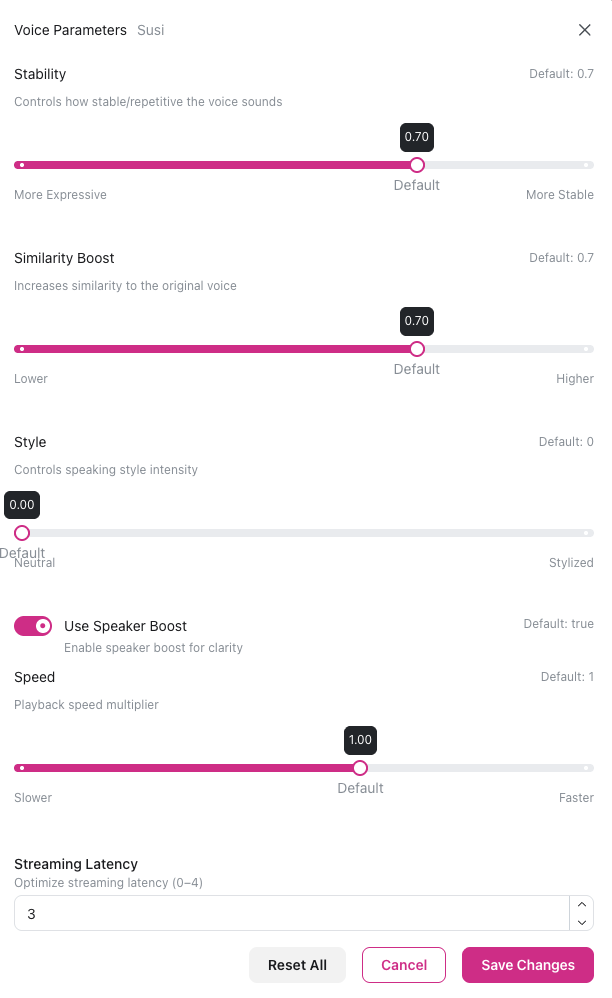
Stability
Controls consistency and expressiveness (range: 0.0-1.0, itellicoAI default: 0.71) How it works:- Lower values (0.3-0.5): More expressive and varied, but less consistent between generations
- Medium values (0.5-0.7): Balanced expressiveness and consistency (recommended)
- Higher values (0.7-1.0): More consistent and predictable, but may sound monotone
Similarity Boost
Controls how closely the voice matches the original speaker (range: 0.0-1.0, itellicoAI default: 0.75) How it works:- Lower values (0.5-0.7): More creative interpretation of the voice
- Medium values (0.75-0.8): Balanced adherence to original voice (recommended)
- Higher values (0.8-1.0): Strict matching to original voice character
Style
Controls stylistic variation in pacing and intonation (range: 0.0-1.0, itellicoAI default: 0.0) How it works:- 0.0: Neutral delivery (recommended)
- 0.5-1.0: Amplified style of the original speaker
Speaker Boost
Enhances clarity and presence (boolean, itellicoAI default: enabled) How it works:- Enabled: Boosts similarity to the original speaker, improving clarity
- Disabled: Standard processing
Speed
Controls playback speed (range: 0.7-1.2, itellicoAI default: 1.0) Speed values:- 0.7-0.9: Slower, clearer delivery
- 1.0: Normal speed (default)
- 1.1-1.2: Faster, more energetic delivery
Cartesia Settings
Cartesia voices support the following adjustable parameter:Speech Rate
Controls how fast the voice speaks (range: 0.5-2.0, default: 1.0) Speech rate values:- 0.5-0.8: Slower delivery for clarity
- 1.0: Normal speed (default)
- 1.2-2.0: Faster delivery for efficiency
Azure Speech Settings
Azure Speech voices do not support adjustable settings through the itellicoAI interface. Azure uses default voice configurations optimized by Microsoft for each neural voice.Adjusting Settings
How to Change Voice Settings
- Navigate to Voice tab in your agent configuration
- Your currently selected voice is displayed in the “Current Voice” card at the top
- Click the gear icon next to your current voice (available for ElevenLabs and Cartesia voices)
- A modal opens with adjustable parameters for your voice
- Adjust sliders or toggles as needed
- Click Save Changes to apply
Common Settings by Use Case
Customer Support
Customer Support
ElevenLabs:
- Stability: 0.60-0.85
- Similarity: 0.75-0.85
- Style: 0.0
- Speed: 0.95-1.05
- Speech Rate: 1.0
Sales
Sales
ElevenLabs:
- Stability: 0.45-0.70
- Similarity: 0.70-0.80
- Style: 0.0
- Speed: 1.05-1.15
- Speech Rate: 1.1-1.2
Technical Support
Technical Support
ElevenLabs:
- Stability: 0.60-0.85
- Similarity: 0.75-0.85
- Style: 0.0
- Speed: 0.95-1.0
- Speech Rate: 0.9-0.95
Healthcare
Healthcare
ElevenLabs:
- Stability: 0.70-0.85
- Similarity: 0.80-0.90
- Style: 0.0
- Speed: 0.9-1.0
- Speech Rate: 0.9
Best Practices
Start with recommended defaults: Itellico defaults are optimized starting points. ElevenLabs recommends stability ≈0.5 and similarity ≈0.75-0.8 as common baselines. Make small changes: Voice settings are sensitive. Adjust in small increments and test after each change. Test in context: Use full conversation scenarios (3-5 minutes), not just single-sentence samples. Consider your audience: Older customers often prefer slightly slower speeds. Younger audiences may prefer slightly faster. Understand latency trade-offs: Higher similarity boost and speaker boost increase latency. Style values >0 can also add latency and reduce stability. Document your settings: Keep track of what works for each use case and voice combination.Next Steps
Custom Pronunciations
Correct pronunciation of brand names and technical terms
Ambient Sound
Add background ambience to calls
Select Voice
Choose a different voice
Test Your Agent
Test your voice settings with web calls